Paper books
The book on your shelf
A paper book with no audiobook: photograph its pages one after another and listen to it like one.
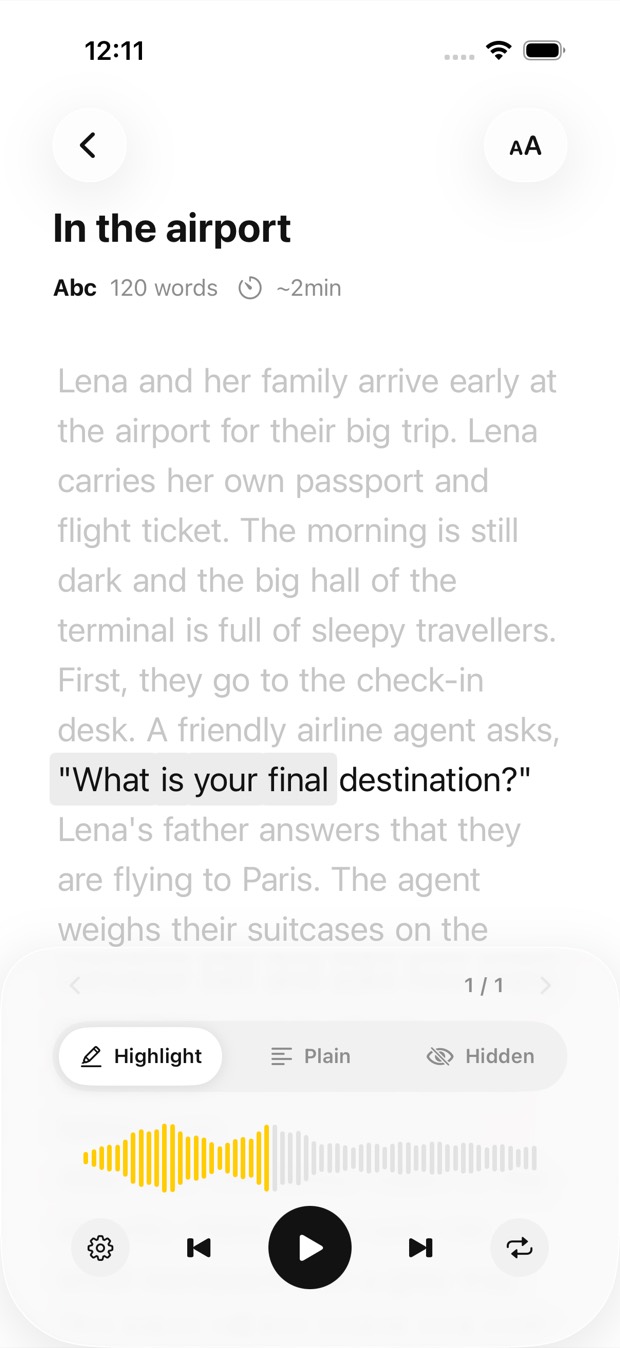
Photograph pages one after another, or pick photos from your gallery. Each photo becomes a page of the book: the text is recognised, translated if you want it, and read aloud in a natural voice while each phrase is highlighted.


Free to download · iOS & Android · No sign-up
In Outloud Reader, start a new book and choose Camera to photograph a page, or Gallery to pick a photo you already took. The text is recognised and read aloud in a natural voice, each phrase highlighted as it’s spoken. Choose another language first and it’s translated before it’s read.
From the page in your hand to the voice in your ears, in four steps.
Start a new book in the app. Choose Camera to photograph pages now, or Gallery to pick photos you already took.
The app finds the page in each photo and crops it; adjust the frame or use the photo as it is. Each photo becomes one page, and up to 50 pages go into one book.
Choose the page’s own language to hear it as printed, or another one to have it translated first. Then choose the voice.
The text is recognised and read aloud in a natural voice. Press play, and the phrase being spoken is highlighted as you listen.
A clear photo reads best. A few things help most:
Whatever is printed on paper, photograph it and listen.
A paper book with no audiobook: photograph its pages one after another and listen to it like one.
Photograph the pages for the next class, or pick the photos of a handout you took in the lecture, and revise by ear.
Hear a letter or a form read aloud while each phrase lights up, so it’s easy to keep your place.
Photograph it and choose your own language: it’s translated in natural sentences, then read aloud.
Outloud Reader for iOS and Android. Your first 5 pages are free.
Free to download · iOS & Android · No sign-up
Something else? Write to support@outloudreader.app and a person will answer.
Yes. Choose Gallery and pick the photos; each one becomes a page of the same book, read aloud with each phrase highlighted.
Only if you want it to. Choose the page’s own language and it’s read as printed; choose another one and it’s translated first.
Usually the page is at an angle, in its own shadow, or the phone focused on the edge of the book rather than the text. Lay the book flat, let the camera settle and keep the whole text inside the frame — or paste the text yourself.
To recognise, translate and read your pages, the app sends the photos and text you add to our server, where AI and speech services process them. Photos are deleted after processing, and your data is never sold or used for ads. The details are in the privacy policy.