Read my notes aloud, phrase by phrase
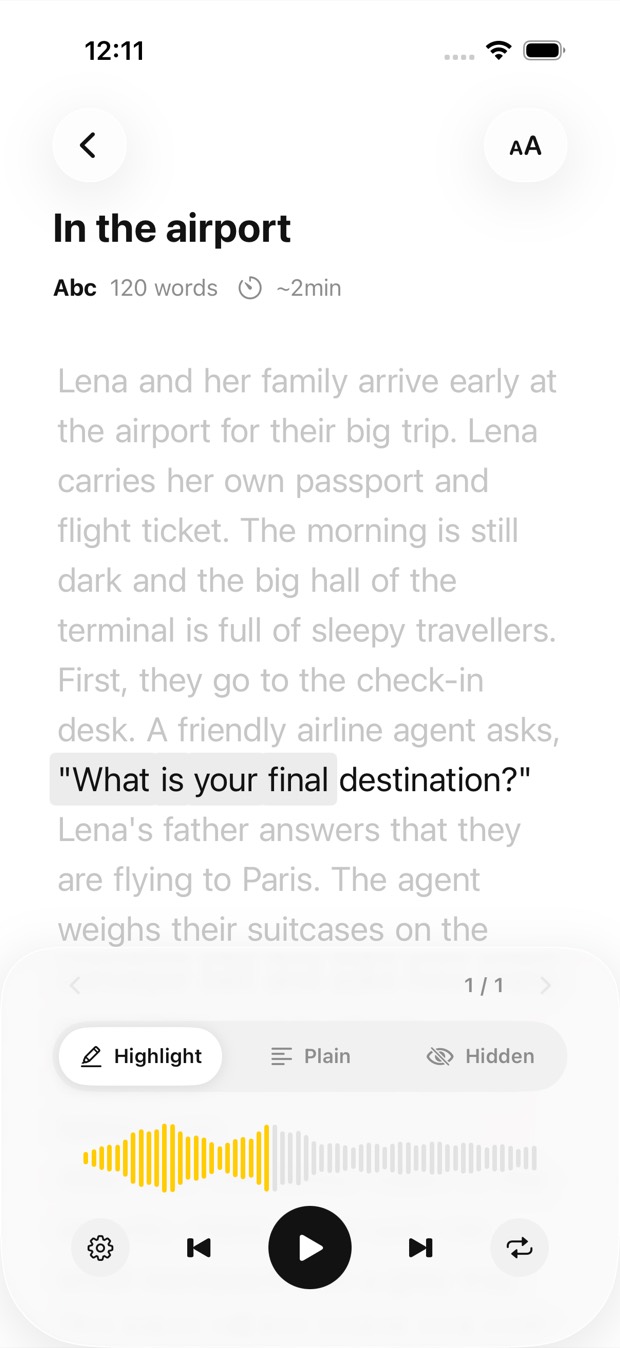
The phrase being spoken is highlighted and its sentence is set in black, so your eyes and ears stay on the same line of your notes.
Photograph your lecture notes, a handout or a page of the textbook, open a PDF or paste your own notes. Outloud Reader reads it aloud in a natural voice and highlights each phrase as it’s spoken, so you can revise on the bus or on a walk.

Free to download · iOS & Android · No sign-up
Outloud Reader is a text to speech app for students. Photograph your lecture notes, a handout or a textbook page, open a PDF of the slides or paste your own notes, and it’s read aloud in a natural voice with each phrase highlighted. Speed it up to 1.25× or slow it down to 0.5×, and play it again as often as you like, free.
Your notes become an audio book you can play from your pocket, as often as you like.
The phrase being spoken is highlighted and its sentence is set in black, so your eyes and ears stay on the same line of your notes.
Speed it up to 1.25× for a quick review, or slow it down to 0.5× for the hard parts.
Hide the text, listen, and hold to check a line. Or follow the highlight, or read with your own eyes.
Put a whole lecture into one book, repeat each sentence up to five times before the exam, and play it again as often as you like.
Photograph the pages after class. By the time you’re on the bus, they’re an audio book you can play from your pocket.
No catalogue and no textbook store: Outloud Reader reads the pages you bring it.
Photograph pages one after another, pick photos from your gallery, choose pages from a PDF, or paste text.
The text is recognised from your photos and read by a natural voice. Up to 50 pages go into one book.
Press play. The phrase being spoken is highlighted, so you can follow along at your desk or just listen on the way.
Outloud Reader for iOS and Android. Your first 5 pages are free.
Free to download · iOS & Android · No sign-up
Something else? Write to support@outloudreader.app and a person will answer.
Yes. Photograph the page, or pick a photo you already took, and it’s read aloud with each phrase highlighted. Photograph page after page and they become one book.
Yes. Open the PDF, choose which pages to listen to, and crop away headers, footers and page numbers you don’t want read out.
No. Playing a book again is free, as often as you like. Pages are used only when a book is made; see pricing.
It reads in 14 languages. Choose the page’s own language to hear it as printed, or another one to have it translated first.