Class reading
A chapter for class
Photograph the pages, press play and follow the highlight from the first line to the last.
Photograph a page, open a PDF or paste text, and Outloud Reader reads it aloud while each phrase lights up as it’s spoken. Many people find it easier to stay with a text when they hear it and see it at the same time.


Free to download · iOS & Android · No sign-up
Outloud Reader reads a page aloud while each phrase is highlighted, so if your attention drifts, you can see where the voice is and find your place again. Listen and read together or hide the text and just listen, slow the voice down, or repeat a sentence up to five times. It isn’t a treatment or a test; many people simply find a text easier to stay with when they hear it and see it at once.
Bring a page, press play and follow along, at your own pace.
Photograph pages one after another, pick photos from your gallery, choose pages from a PDF, or paste text.
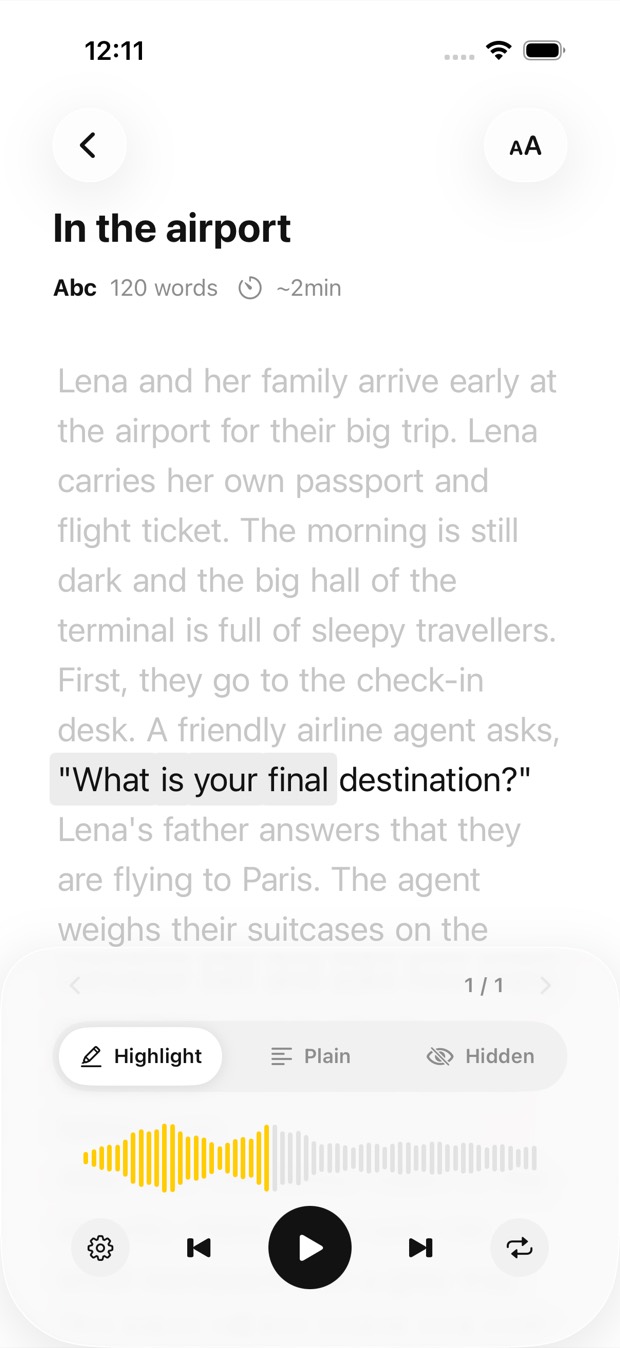
The phrase being spoken is highlighted, its sentence is set in black and the rest of the page waits in grey, so it’s easy to see where you are.
If your attention drifts, the highlight shows where the voice is, so you can find your place again.
Slow the voice down to 0.5× or speed it up to 1.25×, and repeat a sentence up to five times.
Many people find these help most:
The texts that are hard to stay with on your own.
Photograph the pages, press play and follow the highlight from the first line to the last.
Paste it into the app and hear it read aloud while each phrase lights up.
Photograph the letter or the form, and hear it read aloud one phrase at a time.
Paste it in and listen; look at the page whenever you want to see where the voice is.
Outloud Reader for iOS and Android. Your first 5 pages are free.
Free to download · iOS & Android · No sign-up
Something else? Write to support@outloudreader.app and a person will answer.
It’s a text to speech app for anyone who would rather listen, or listen and read together. It isn’t a treatment or a test, and it isn’t only for ADHD; many people simply find a spoken, highlighted text easier to stay with.
The phrase being spoken is highlighted and its sentence set in black, while the rest of the page waits in grey. If your attention drifts, look for the highlight to find your place again.
Yes. Hide the text and listen, and hold to check a line whenever you want to see it.
Yes. Choose light, sepia or dark, and set the contrast, the text size and the line spacing to suit you.