A printed menu at the table
Photograph each page of the menu while you wait, and hear the starters, mains and desserts in your language before you order.
A menu translator for the table abroad: photograph the menu, choose your language, and Outloud Reader translates it in natural sentences and reads it aloud, highlighting each phrase as it’s spoken.

Free to download · iOS & Android · No sign-up
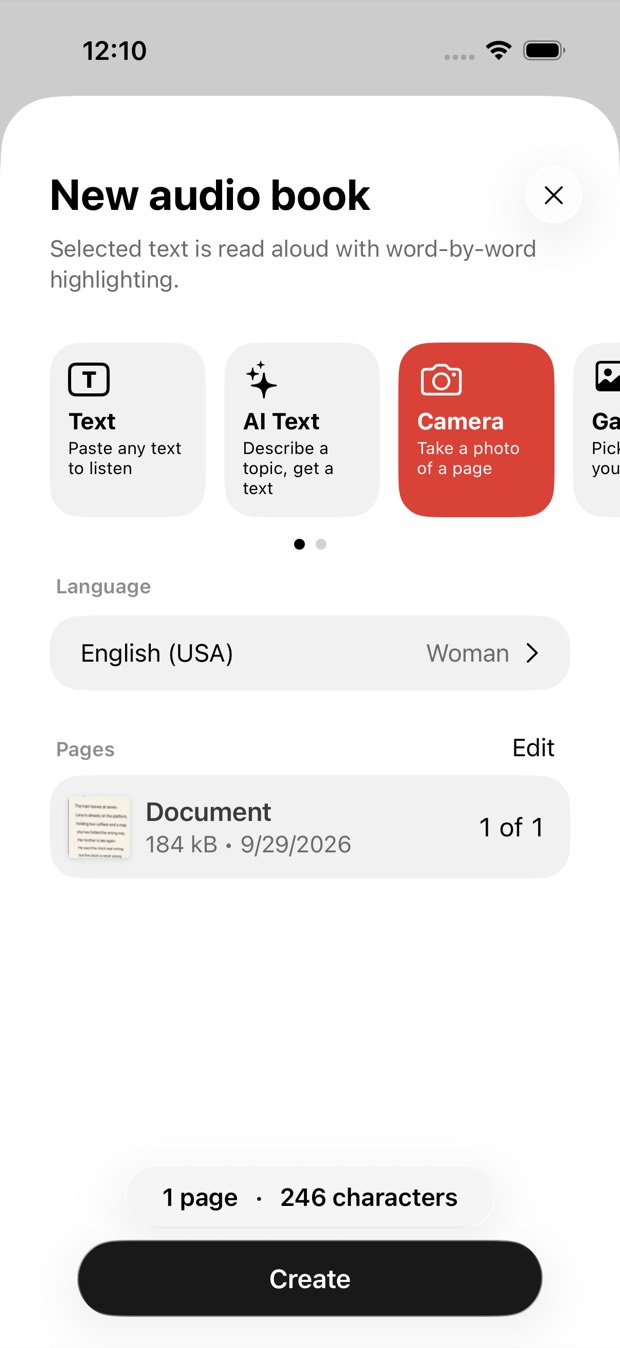
To translate a menu with your camera, start a new book in Outloud Reader, choose Camera and photograph the menu, choose your own language and tap Create. The text is recognised, translated and read aloud, each phrase highlighted. It works from a photo, not a live camera view.
Any menu you can photograph, you can hear in your language. The text around the meal too: a food label in the shop, a sign by the door.
Photograph each page of the menu while you wait, and hear the starters, mains and desserts in your language before you order.
Drinks and specials on a board by the counter: get close, photograph it and listen. Neat lettering reads well; hurried chalk writing may not.
A leaflet from the counter or the letterbox: photograph both sides, and it stays in your library, ready when you order.
No typing dish names in an alphabet you don’t know: the text is found for you.
Start a new book and choose Camera, or Gallery for a photo you already took. The app finds the page in each photo and crops it.
Choose the language you want to hear, any of the 14 the app reads in, and a voice. If it isn’t the menu’s own, the text is translated first.
The words are recognised and translated in natural sentences, and a book is made of the menu. Nothing to type or copy.
Press play and follow the highlighted phrase. Tap a word to hear it again from there; the menu stays in your library to check later.
Once the menu is a book, you decide how to listen:
What it doesn’t do: it doesn’t show photos of dishes or describe them, and it gives no allergen advice. Printed menus read best; a handwritten board may fail if the writing is unclear. A translation can be wrong, so ask the staff about allergies.
Get the appChoose any of the 14 languages the app reads in when you make the book. Choose the menu’s own language instead and it’s read as printed, without translation.
The menu is read, translated and voiced online, so making a book needs the internet. Once it’s made, it plays offline, with the screen off.
Each photo uses one page of your balance, and a few pages are free to try. More come in packs that never expire, or with Premium; prices are shown in the app.
Outloud Reader for iOS and Android.
Free to download · iOS & Android · No sign-up
Something else? Write to support@outloudreader.app and a person will answer.
Yes. Photograph the menu, or pick a photo you already took, and choose your language: the text is recognised, translated in natural sentences and read aloud with each phrase highlighted. It works from a photo, not a live camera view.
No. It reads and translates the words on the menu; it doesn’t show or describe dishes and gives no allergen or health advice. A translation can be wrong, so if you have an allergy, ask the staff.
Making the book needs a connection, because the text is recognised, translated and voiced online. Once the menu is in your library, it plays offline.
Yes. It’s an app for iPhone, iPad and Android, free to download, with a few pages free to try. More pages come in packs or with Premium; prices are shown in the app. Playing a finished menu again costs nothing.
English (US and UK), Spanish, French, Italian, Portuguese, German, Dutch, Polish, Ukrainian, Russian, Turkish, Japanese, Korean and Chinese — with a woman’s or a man’s voice in all of them except French, which has a woman’s voice.