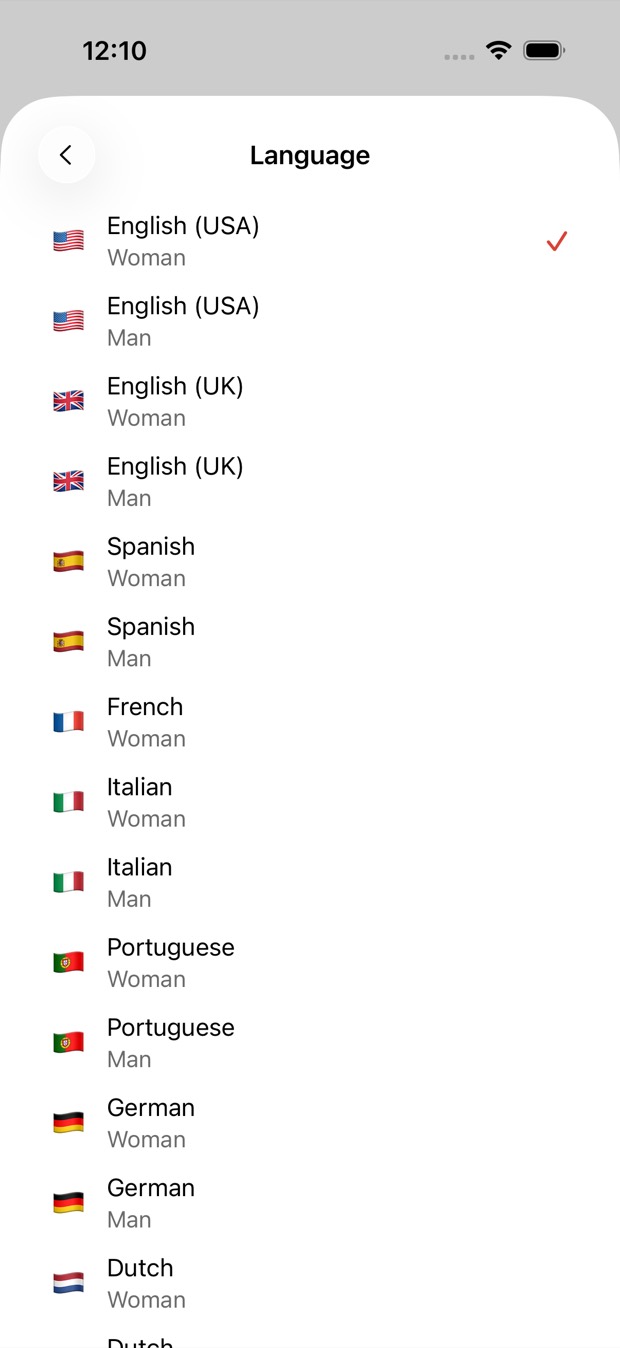
14 languages, natural voices
From English and Spanish to Ukrainian, Japanese, Korean and Chinese: 14 languages, with a woman’s or a man’s voice in all but French.
A text to speech app usually wants text. Here a photo is enough: photograph a page or pick a picture, and the text is recognised for you, then read aloud in a natural voice in one of 14 languages, each phrase highlighted.


Free to download · iOS & Android · No sign-up
Outloud Reader is text to speech that starts from a photo: photograph a page or pick a picture, and the text is recognised for you and read aloud in a natural voice. Choose one of 14 languages and a woman’s or a man’s voice (French has a woman’s), and have the page translated before it’s read if you like.
What a text to speech app does, with the typing left out.
Start a new book and choose Camera, or Gallery for a photo you already have. The app finds the page in the photo and crops it.
Choose the language and the voice. Pick a language other than the page’s, and the text is translated before it’s spoken.
Tap Create. The text is spoken in a natural voice, at any speed from 0.5× to 1.25×, with each phrase highlighted as it’s read.
The clearer the text in the photo, the better it’s recognised. It works well with:
Clear handwriting often works; messy handwriting may not be recognised. Very small or blurred text, or a page shot at an angle, may not be read either.
Get the appFrom English and Spanish to Ukrainian, Japanese, Korean and Chinese: 14 languages, with a woman’s or a man’s voice in all but French.
Turning a photo into speech happens online, so making a book needs a connection. The finished audio plays offline.
You pay per page, not per minute of audio: each photo is a page, and playing it again costs nothing. Pages come in packs or with Premium.
Your first 2 pages are free.
Outloud Reader for iOS and Android. Your first 2 pages are free.
Free to download · iOS & Android · No sign-up
Something else? Write to support@outloudreader.app and a person will answer.
No. The text in the photo is recognised for you. If you already have it as text, paste it instead.
Not for making a book: the text is recognised and voiced online. Once a book is made, it plays offline, as often as you like.
English (US and UK), Spanish, French, Italian, Portuguese, German, Dutch, Polish, Ukrainian, Russian, Turkish, Japanese, Korean and Chinese — with a woman’s or a man’s voice in all of them except French, which has a woman’s voice.
No. The audio stays in your library in the app, ready to play again as often as you like, at no cost. It isn’t exported as a file.